Best Free AI Tools for Students in 2026 (Updated List)
Most lists of “free AI tools for students” are recycled from 2024, and it shows. They still recommend tools that have been retired, free tiers that have since been paywalled, and student offers that expired more than a year ago.
This list was checked in August 2026. Where a tool’s limits are unclear or keep moving, that is stated plainly rather than filled in with a confident number.
One thing to keep in mind before anything else: free tier limits are the single most volatile thing in this entire category. Message caps, credit counts, and upload limits change every few months, and different sources often report different figures for the same week. Treat every specific number below as a starting point and confirm it on the tool’s own pricing page.
The quick answer
If you only want a working setup and not a tour, this covers most coursework at no cost:
| Job | Tool | What the free tier covers |
|---|---|---|
| General questions, drafting, explaining | ChatGPT, Gemini, Claude, or Copilot | Full chat, web answers, file uploads, with usage caps |
| Reading and summarising your own sources | Gemini Notebook (formerly NotebookLM) | Upload notes and PDFs, ask grounded questions, audio and video overviews |
| Finding academic papers | Semantic Scholar | Free search across a very large paper index, with AI summaries |
| Managing citations | Zotero | Free and open source, 300 MB of free sync storage |
| Memorising | Anki | Free on desktop, Android, and web |
| Grammar and clarity | Grammarly Free | Real-time grammar, spelling, and tone, with a monthly cap on AI prompts |
| Slides and posters | Canva Free | Full editor, most premium assets locked |
General AI assistants: what free actually gets you
All four major assistants have a real free tier in 2026, not a trial. The differences are in usage limits and extras rather than basic capability.
ChatGPT is the default for most students. Its free tier includes chat, web search, image generation, and file uploads. Its message limits are the messiest thing to pin down: coverage through 2026 reports everything from a hard cap of roughly ten messages every five hours to the removal of text message limits for free users from August 2026. Sources genuinely disagree here, so check OpenAI’s own help pages rather than trusting any list, including this one. One change is widely reported and worth knowing: since February 2026, free users in the United States see labelled ads beneath some answers, and paid tiers do not. Fello AI
Gemini is the strongest free option if you live inside Google Docs, Drive, and Gmail. It also has the most generous student offer of 2026, covered further down.
Claude free access is limited to Anthropic’s mid-tier models rather than its flagship, and usage runs on a rolling window rather than a daily reset. Anthropic publishes its context limit clearly at 200,000 tokens across models, which in practice means you can paste a long paper or a full chapter and still have room to ask about it. Reported message allowances vary between sources, so expect a working session rather than an unlimited one. Engadget
Microsoft Copilot is free on the web, in Windows, and in Edge. Microsoft describes the free version as suited to general questions and web-based tasks. The important limitation: the free version does not put Copilot inside Word, Excel, and PowerPoint. That requires a Microsoft 365 subscription, though many universities provide one, so check with your institution before paying for anything. Microsoft Support
A practical note on all four: they will invent citations if you ask them for sources. Every fabricated reference in a submitted essay is your problem, not the tool’s.
Reading, research, and citations
This is where free tools genuinely outperform paid general chatbots, because they are grounded in real documents rather than generating plausible text.
Gemini Notebook is the tool most worth learning. Google renamed NotebookLM to Gemini Notebook in July 2026, keeping it as a standalone research product while integrating it more deeply across Google’s ecosystem. Existing notebooks and shared links continue to work through automatic redirects. You upload your own lecture slides, readings, and notes, and it answers only from those, with citations back to the source. Reported free limits sit around 50 sources per notebook and roughly 50 chat queries a day, but Google restructured the tiers in 2026 and the caps have moved more than once, so confirm the current figures in the product itself. GoogleGoogle Workspace
Semantic Scholar, built by the Allen Institute for AI, is completely free and remains the best free starting point for finding papers, with AI-generated one-line summaries and citation graph tools.
Elicit and Consensus both have functional free tiers with real limits. Elicit is strongest for pulling structured data out of a stack of papers. Consensus is faster for checking whether the literature supports a specific claim. Free credit allowances on both are limited and reported inconsistently across sources, so use them for focused work rather than open browsing.
Zotero is not an AI tool, but it belongs in any student stack. It is free, open source, and run by a nonprofit. Free cloud storage for PDFs and attachments is capped at 300 MB, which fills up faster than you expect. Two workarounds cost nothing: turn off file syncing so only citation data syncs, or check whether your university subscribes to Zotero’s institutional plan, which several do. Penn Libraries
Writing and editing
Grammarly still has one of the better free tiers in software. It covers real-time grammar, spelling, punctuation, and basic tone detection across your browser and documents. The generative AI features are capped, with the free plan widely reported at 100 AI prompts per month against 2,000 on Pro. For catching mechanical errors before you submit, free is enough. For rewriting whole paragraphs, you will hit the ceiling quickly. HyperWrite
Grammarly also markets an AI text detector. Treat it, and every other AI detector, with heavy scepticism. These tools produce false positives on human writing, particularly for students writing in a second language, and no detector should be treated as evidence of anything on its own.
Revision and memorisation
Anki remains the best free option, and it is not close. It is open source, has been in development since 2006, and uses spaced repetition to schedule reviews around when you are likely to forget. It is free on desktop and Android, with the iOS app as a one-time purchase of about $24.99 that funds development of the whole project. Free browser access through AnkiWeb works on an iPhone if you would rather not pay. Bestaistudytools
Quizlet is the tool most students reach for first, and it is the one most changed. Multiple 2026 reviews report that its adaptive Learn mode, practice tests, and AI card generation now sit behind a subscription, leaving basic flip-through flashcards on the free plan. Several of those reviews come from competing apps, so read them with that in mind, but the direction of travel is consistent enough to check the current free tier yourself before building a term’s revision around it.
Design, slides, and posters
Canva Free covers more than most students need: the full editor, thousands of templates, and basic AI generation, with premium assets locked.
Here is the part that most listicles get wrong. Canva Education is free for eligible K-12 schools and students, but college and university students do not qualify for that program. Higher education access runs through Canva for Campus, which is managed by the institution rather than the individual student. If you are at university, ask whether your institution provides it. If it does not, you are on Canva Free, and any site offering you “Canva Pro for students” through an invitation link is not an official route. CostBenchTruescho
Recording lectures
Otter has a free plan that is useful within tight limits. Independent 2026 breakdowns consistently report roughly 300 transcription minutes a month, a 30-minute cap on any single recording, and a small lifetime allowance of file imports. Otter changes these regularly, so confirm before you rely on it for a full lecture. A one-hour lecture will cut off halfway on the free plan.
Free built-in alternatives worth trying first: live captions in Google Meet, the Transcribe feature in Microsoft Word online, and your phone’s own voice recorder paired with a summarising tool afterwards.
Before recording anything, check your institution’s policy. Recording lectures without permission is prohibited at many universities regardless of what the software allows.
Student offers worth claiming in 2026
These are real, first-party offers, and both come with an auto-renewal you need to plan for.
Google. Eligible college students in the United States can claim one year of Google AI Pro free, which includes higher usage limits in Gemini, Gemini in Google apps like Gmail and Docs, and 5 TB of storage. Eligible students outside the United States are offered one year of Google AI Plus instead, with 400 GB of storage. Verification runs through SheerID, a valid payment method is required, the plan converts to a paid subscription after twelve months unless cancelled, and the deadline to redeem is December 31, 2026. Some countries are excluded from the terms, so check your local Gemini for Students page before planning around it. Google + 2
OpenAI. The 2026 Back to School offer gives eligible students four free monthly billing periods of ChatGPT Plus, verified through SheerID, and is open to full-time and part-time college and graduate students at eligible US degree-granting institutions. A valid payment method is required, the subscription renews at $20 per month unless cancelled, and the claim deadline is October 31, 2026. OpenAI Help CenterOpenAI Help Center
Perplexity. The free tier gives unlimited basic searches with citations plus a small daily allowance of deeper “Pro” searches, and the Comet browser is free. The free year for students that circulated widely in 2024 and 2025 ended in January 2026. Verified students can now get a discounted Education Pro plan instead.
Set a calendar reminder for the day before any of these renew. That is the entire trick.
What is no longer free, or never was
- Microsoft Math Solver is gone. Microsoft announced its retirement on July 7, 2025. Many 2026 listicles still recommend it. Microsoft points users toward Math Assistant in OneNote instead. X
- Khanmigo is not free for students. Khan Academy’s AI tutor is free for teachers and costs $4 per month for learners and parents. The rest of Khan Academy, including every video, exercise, and test prep course, remains free, which is the part that matters most. Khan Academy
- Canva Education excludes university students, as covered above.
- Perplexity’s student free year ended in January 2026.
Using these without getting into trouble
Institutional AI policies vary enormously, and they change between departments, not just between universities. A few things hold generally true.
Verify every citation an AI gives you by finding the actual paper. Do not paste unpublished research, personal data, or another person’s work into a free tier, since free plans are the most likely to use your inputs for model training. And be specific about what you are asking for: “explain why this proof works” produces something you can learn from, while “write my essay” produces something you cannot defend in a viva.
Rules on this differ by institution and by course, so your own department’s guidance overrides any general advice.
A free stack that covers most coursework
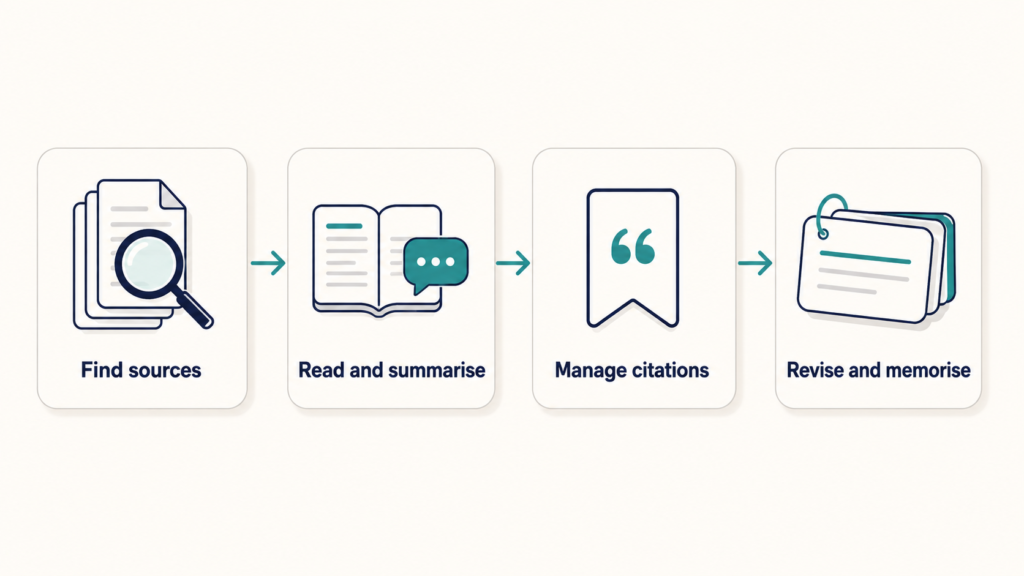
Gemini Notebook for your own readings, Semantic Scholar for finding new ones, Zotero for citations, one general assistant for drafting and explanation, Anki for anything you have to memorise, and Grammarly Free as a final pass before you submit.
That combination costs nothing, has no trial period, and does not expire.
FAQ
Is ChatGPT still free in 2026?
Yes. Anyone can use it with a free account. The free tier’s message limits have changed several times during 2026 and sources report them inconsistently, so check OpenAI’s help pages for current figures. In the United States, the free tier now shows labelled ads.
Which free AI tool is best for writing a research paper?
No single one. Use Semantic Scholar to find papers, Gemini Notebook to interrogate the ones you have downloaded, Zotero to manage citations, and a general assistant only for structure and clarity feedback. Never let a chatbot produce your reference list.
Do I need a .edu email for the student offers?
Not always. Google and OpenAI both verify enrollment through SheerID, which may accept school records, a single sign-on login, or supporting documents rather than an email domain alone. Both currently require a valid payment method even though the promotional period is free.
Are these student offers available outside the United States?
Partly. Google’s offer covers students in more than 140 markets, though the plan differs by region and some countries are excluded. OpenAI’s 2026 Back to School offer is limited to eligible US institutions. Always open your own country’s version of the offer page.
Will my university know if I use AI?
AI detectors are unreliable in both directions and should not be treated as proof. What matters more is your institution’s policy on what you may submit and how you must disclose assistance. Check your course handbook rather than guessing.
Is Anki really free?
On Windows, macOS, Linux, Android, and the web, yes. The official iPhone and iPad app is a one-time purchase of about $24.99, which funds development of everything else. You can review for free on an iPhone through the AnkiWeb site in a browser.